Discover the fastest way to type emoji on Mac and make your messages, social posts, and emails more expressive in seconds.
Have you ever been typing an email on your Mac when you suddenly wanted to add a 😂 or ❤️ but couldn’t remember how? It happened to me while replying to a friend.
I knew the emoji would make the message feel warmer, yet I wasted several minutes searching online for the shortcut. If you’ve experienced the same frustration, you’re not alone.
Thankfully, macOS includes a built-in emoji keyboard that’s quick, easy, and works almost everywhere.
If you’re chatting on WhatsApp Web, posting on Instagram, creating TikTok captions, or sending professional emails, learning how to use Emoji on Mac can save time and make your conversations feel more personal.
What does emoji on Mac mean?
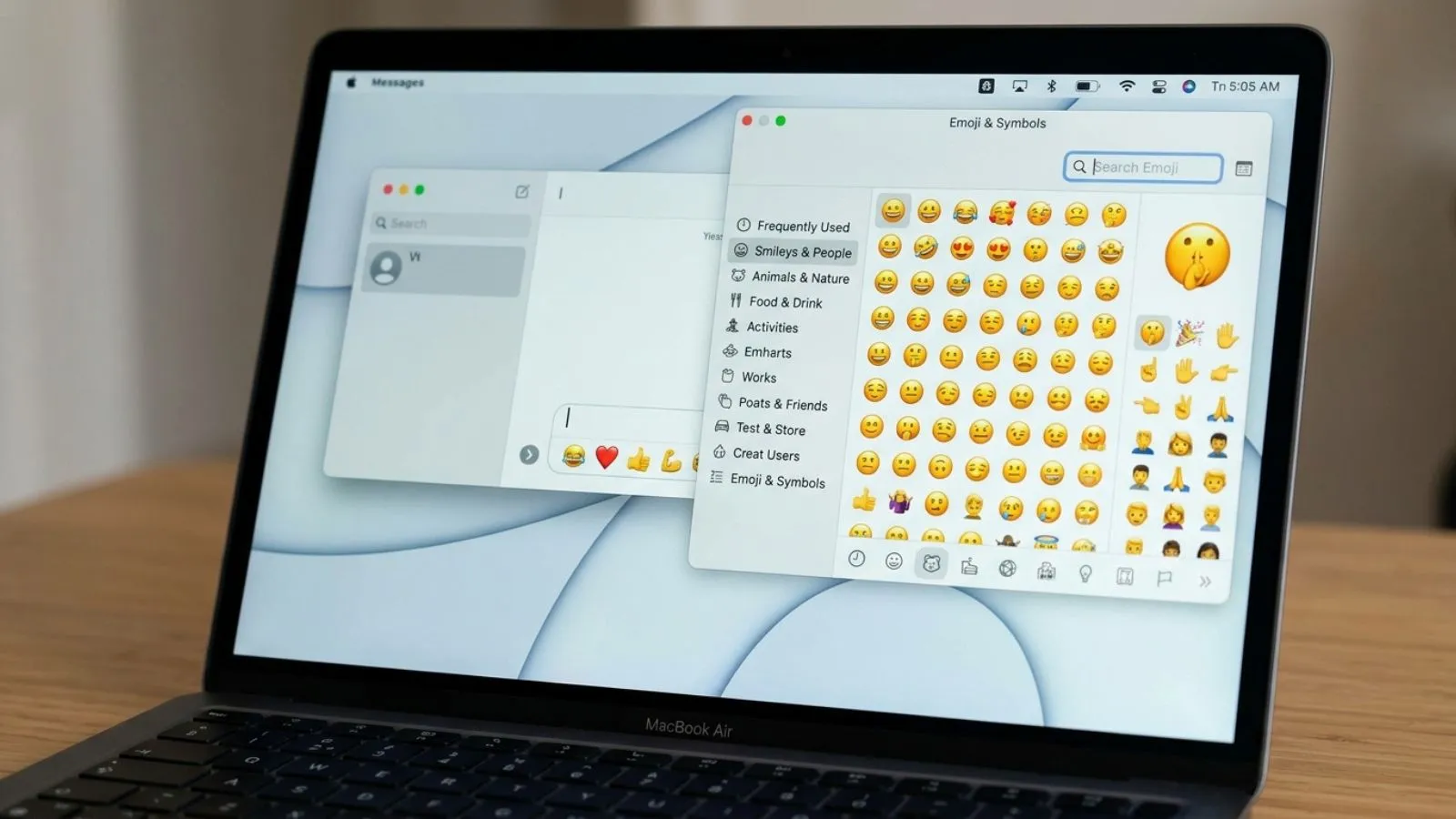
The term emoji on Mac simply refers to the built-in emoji picker available in macOS. Instead of copying emojis from websites, Mac users can access thousands of emojis directly from their keyboard.
The emoji viewer includes:
- 😀 Smileys and emotions
- 🐶 Animals and nature
- 🍕 Food and drinks
- ⚽ Sports
- ✈️ Travel
- ❤️ Hearts
- 🎉 Celebrations
- 🌍 Flags
- 💼 Objects
- ⭐ Symbols
The emoji panel also includes:
- Recently used emojis
- Search feature
- Categories
- Symbols and special characters
This makes typing emojis on a Mac much faster than switching to your phone.
How to use emoji on Mac emojis
Using emojis on macOS is incredibly simple.
Keyboard Shortcut
Press:
Control (⌃) + Command (⌘) + Space
The emoji picker instantly appears wherever you’re typing.
It works in:
- Messages
- Notes
- Safari
- Chrome
- Microsoft Word
- Slack
- Discord
- WhatsApp Web
- Instagram (browser)
- TikTok captions
- Google Docs
Search for an Emoji
Instead of scrolling forever:
- Open the emoji picker.
- Type words like:
- smile
- heart
- fire
- laugh
- cat
Mac instantly filters matching emojis.
Double Click to Insert
Click or double-click an emoji to place it into your text.
Example:
Before:
Thanks for helping me
After:
Thanks for helping me 😊
Best emoji combinations for copy paste
Here are ready-to-use emoji combinations you can copy instantly.
| Style | Emoji Combo |
| Happy | 😊✨🌸 |
| Love | ❤️🥰💖 |
| Funny | 😂🤣🙈 |
| Aesthetic | 🤍☁️✨ |
| Cozy | ☕📖🍂 |
| Gaming | 🎮🔥🏆 |
| Study | 📚✏️☕ |
| Success | 🚀💯✨ |
| Celebration | 🎉🥳🎊 |
| Travel | ✈️🌍📸 |
Popular Heart Combos
❤️✨
🩷🌸
🤍☁️
💜⭐
🩵🌊
🖤🥀
Cute Combos
🐻🤎
🌙✨
🌼💛
🍓🍰
🐱💕
Instagram Favorites
✨📸🤍
🌴☀️🌊
💖🌸🦋
🌙☁️⭐
Aesthetic emoji ideas for social media
Mac users often create captions directly from their laptops. These emoji styles are especially popular on Instagram, TikTok, Pinterest, and WhatsApp in 2026.
Soft Girl
🤍🩷🌸☁️
Caption:
Living my best soft life 🤍☁️
Minimal
🤍✨
Simple yet elegant for bios and captions.
Luxury
💎✨🤍
Perfect for fashion, jewelry, and premium brands.
Nature
🌿🍃🌼
Ideal for travel and outdoor photography.
Dark Aesthetic
🖤🌙🥀
Great for moody edits and nighttime photography.
Travel
✈️🌍📸
Perfect for vacation reels.
Food
🍜🍕🍩☕
Excellent for food bloggers.
Fitness
💪🏋️🔥
Popular among gym creators.
Common problems and solutions
Even though using emoji on Mac is easy, users sometimes run into small issues.
| Problem | Solution |
| Emoji shortcut doesn’t work | Restart the app or check keyboard shortcuts in System Settings. |
| Emoji panel won’t open | Update macOS and try the shortcut again. |
| Emojis appear as empty boxes | The receiving device may not support newer emojis. |
| Emoji looks different on another device | Apple, Android, Windows, and social apps use different emoji designs. |
| Can’t find an emoji | Use the search bar inside the emoji picker. |
| Emoji not showing on websites | Refresh the page or try another browser. |
Why do emojis look different?
Apple, Google, Microsoft, Samsung, and other platforms design their own emoji artwork.
For example:
😂 looks slightly different on:
- Mac
- iPhone
- Android
- Windows
The meaning stays the same, but the appearance changes.
Trending emoji usage in 2026
Emoji trends continue to evolve with internet culture. In 2026, these emojis are among the most commonly used across social media.
| Emoji | Popular Meaning |
| 😂 | Funny moments |
| 🤍 | Clean aesthetic |
| ✨ | Glow-up and excitement |
| ❤️ | Love and appreciation |
| 🫶 | Support and kindness |
| 🔥 | Something impressive |
| 😭 | Laughing or emotional reactions |
| 💀 | “I’m dead” from laughter |
| 🥹 | Gratitude and heartfelt emotion |
| 🚀 | Success and growth |
Viral Caption Example
New chapter begins 🚀✨🤍
TikTok Style
POV: Everything finally worked out 🥹❤️
Instagram Style
Chasing dreams one step at a time ✨🌎🤍
FAQs
How do I open emoji on Mac?
Press Control (⌃) + Command (⌘) + Space to open the built-in emoji picker.
Can I use emoji on Mac in every app?
Yes. Most apps, including Mail, Notes, Safari, Chrome, Slack, Discord, WhatsApp Web, and Google Docs, support Mac emojis.
Why do Mac emojis look different from Android?
Each platform has its own emoji design. The meaning stays the same, but the artwork varies.
Can I search for emojis on Mac?
Yes. The emoji picker includes a search bar, allowing you to find emojis by typing keywords like “heart,” “smile,” or “fire.”
Do emojis work in Microsoft Word on Mac?
Yes. You can insert emojis into Word documents using the same keyboard shortcut.
Are new emojis added to Mac?
Yes. Apple regularly introduces new emojis through macOS updates, so keeping your system updated ensures access to the latest emoji designs.
Conclusion:
Using Emoji on Mac is one of the easiest ways to add personality, emotion, and creativity to your digital conversations.
With the simple Control + Command + Space shortcut, you can instantly access thousands of emojis without leaving your current app.
If you’re replying to emails, creating Instagram captions, chatting on WhatsApp Web, writing in Google Docs, or posting viral TikTok content, the built-in emoji picker helps you communicate more naturally.
Beyond basic smileys, Mac also offers symbols, special characters, and a powerful search feature that saves time.
As emoji trends continue evolving in 2026, knowing how to quickly find, copy, and use the right emoji helps your content feel more engaging and modern.
Keep experimenting with different emoji combinations, aesthetic styles, and trending icons to make your messages stand out while expressing exactly how you feel.